

Before the 2024 U.S. Open, Bryson DeChambeau and coach Dana Dahlquist were trying to answer a specific question: why was the ball moving to the right? They paired body-motion data captured by Sportsbox with shot data from a Foresight device and looked for the movement variables associated with the miss. DeChambeau customer case
Sportsbox AI makes a swing-analysis app. A golfer records a swing with a phone, the software turns the two-dimensional video into a three-dimensional motion model, and the app measures how the body rotates, shifts, and tilts. It measures how the golfer moves. It does not claim that a phone alone replaces every device used to measure ball flight.
In April 2026, this high-profile user became part of the buying group: investors led by DeChambeau announced that they had acquired Sportsbox AI. The announcement did not disclose the precise transaction value. Acquisition announcement
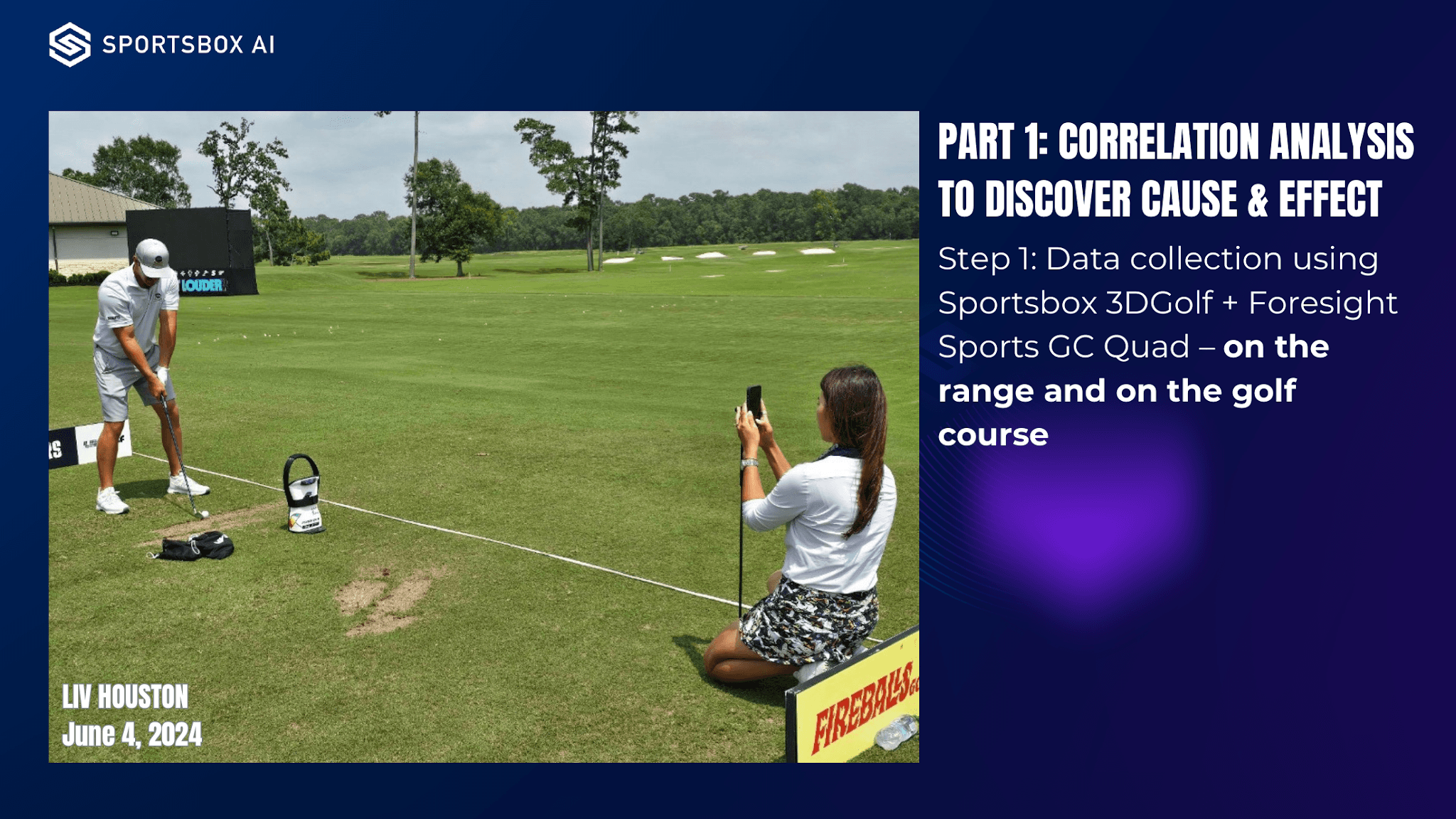
The phone records body movement while Foresight records the shot. Source: Sportsbox customer case.
The interesting commercial move is not that Sportsbox added an AI chat box to golf. It brought part of a professional coach’s work of observing, explaining, and correcting movement onto the phone.
Slow motion can replay a swing, but change has to be measured
DeChambeau’s team did not send every available metric to the player. It selected a small number of movement variables that appeared related to the rightward miss and could be addressed in training. The coach still decided what should change.
One example in the case compares upper-body bend at address with the spin axis of the ball. After an adjustment, the team looked at the measurements again to check whether the player’s new feeling had produced a real change in body position. This was an analysis of one golfer’s sample, not a universal prescription for every swing. A relationship in the chart also does not establish that one variable alone caused the result.
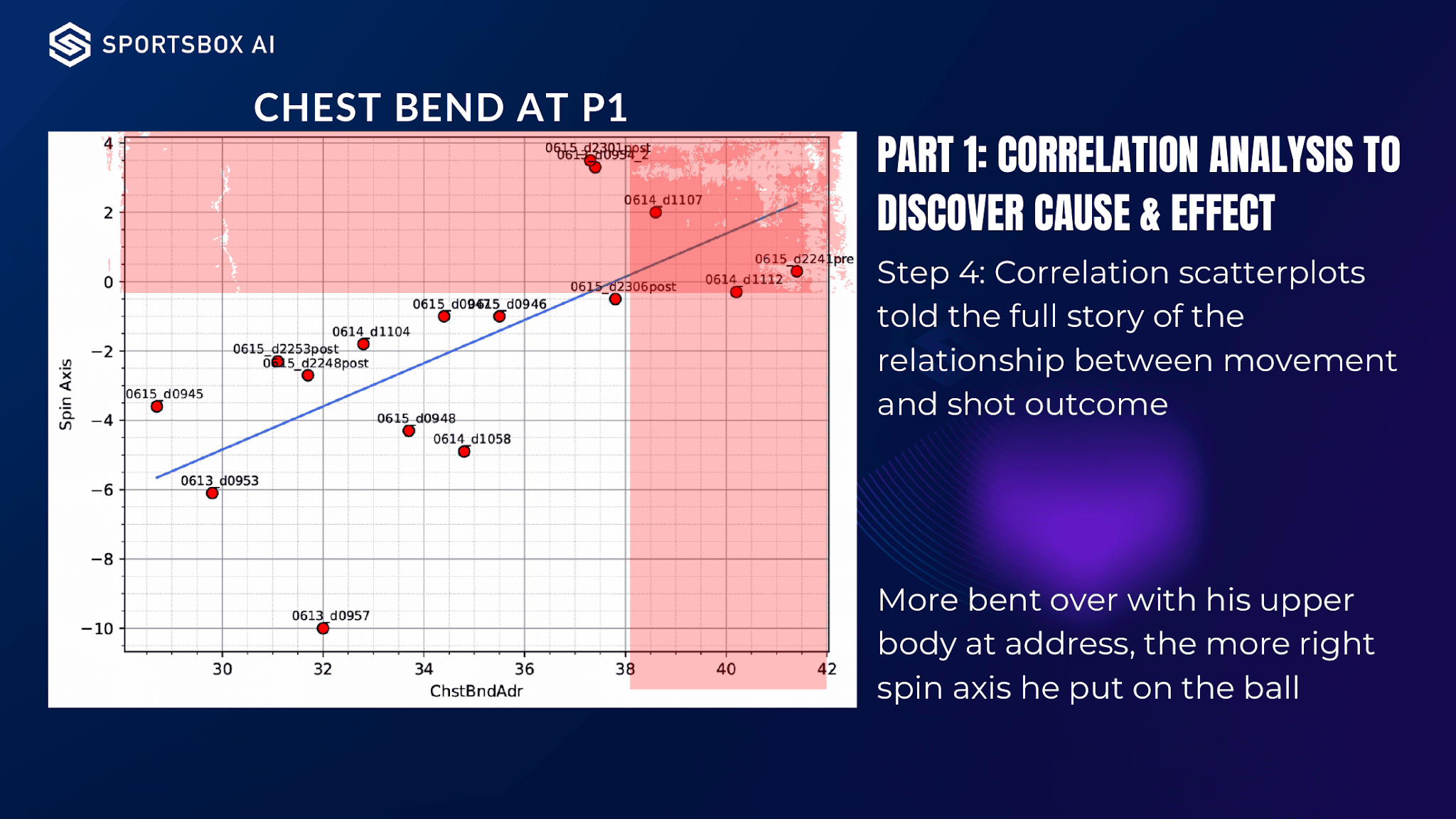
The source chart places chest bend at address on the horizontal axis and ball spin axis on the vertical axis. It shows an association in this player’s sample. Source: Sportsbox customer case.
This is why ordinary slow-motion replay is not enough for the product’s target job. Video can show that two swings look different, but it is harder to answer which body segment changed, by how much, and whether the direction matches what the coach requested.
Sportsbox’s official tutorial presents a direct workflow: convert two swings into three-dimensional models and compare their angles and displacement at the same stage. A player can compare a swing before and after a lesson or use a selected reference swing. The comparison reduces dependence on judging differences from camera perspective alone. Reference-swing comparison tutorial
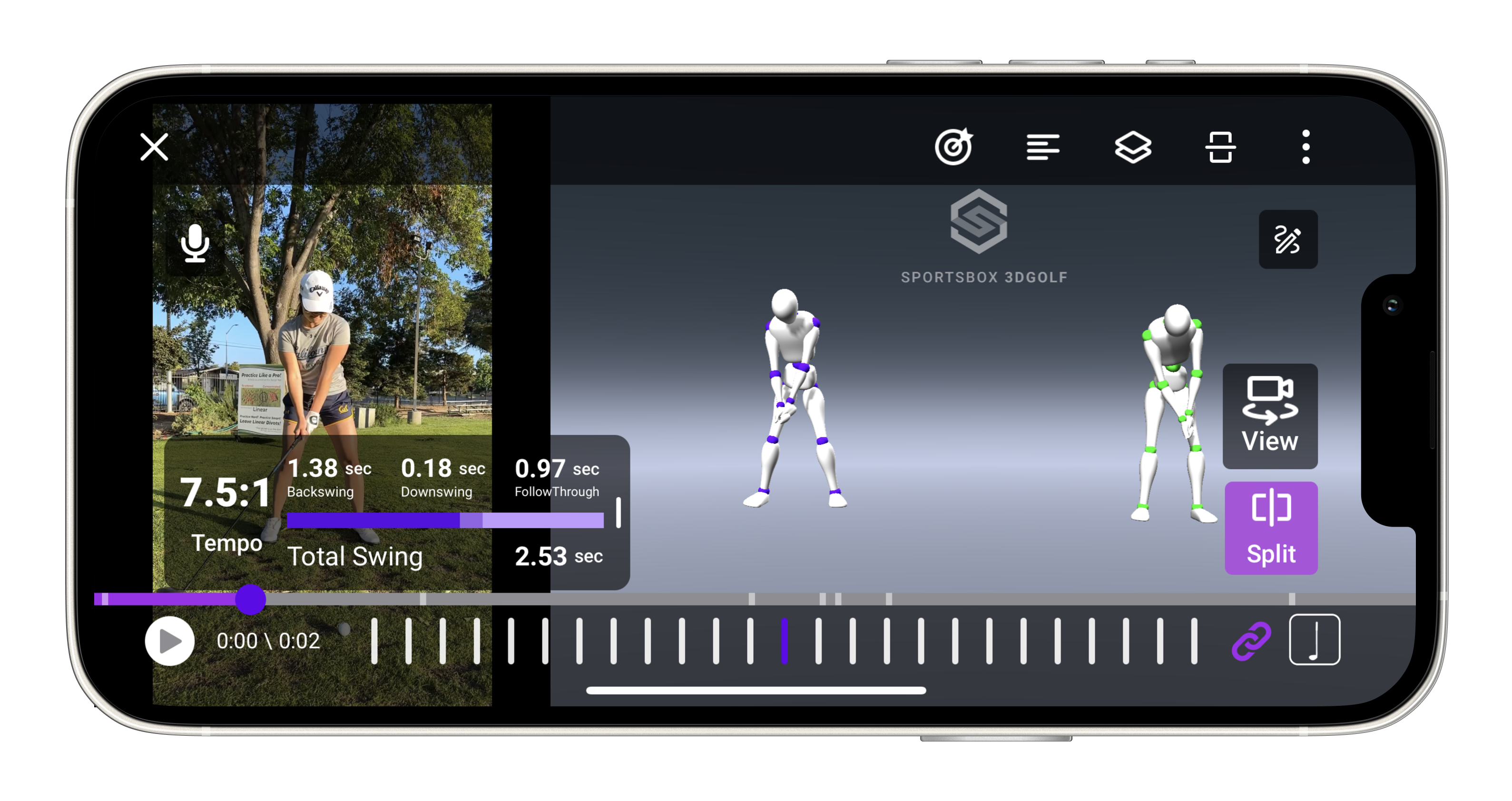
The analysis view places the recorded video next to current and reference motion models. Source: Sportsbox help center.
The app therefore sells a repeatable record, not only a visual effect. The same movement can be measured at multiple sessions, compared with a target, and discussed using values that both golfer and coach can see.
Check practice even when the coach is absent
Sportsbox serves golfers who train on their own, but it also sells to instructors whose business depends on coaching other people.
A coach can import a student’s video, analyze the movement, and send back a screen recording with spoken explanation. After the coach defines target ranges, later practice data can be compared with those goals. The company says more than 500 coaches and more than 50,000 golfers use its 3D analysis. Those are company-reported usage figures, not a public count of paying customers. Coach product and adoption disclosure
This workflow addresses a concrete gap in instruction. During a lesson, the student may understand the correction. Away from the coach, the student may not know whether the practice swing actually matches it.
The official help page describes Practice Mode as a loop for that period between lessons. The golfer positions the phone and selects the metrics to monitor. The app detects, trims, and analyzes each swing automatically. The golfer reviews the feedback, swings again, and later checks the session’s progression. Practice Mode instructions
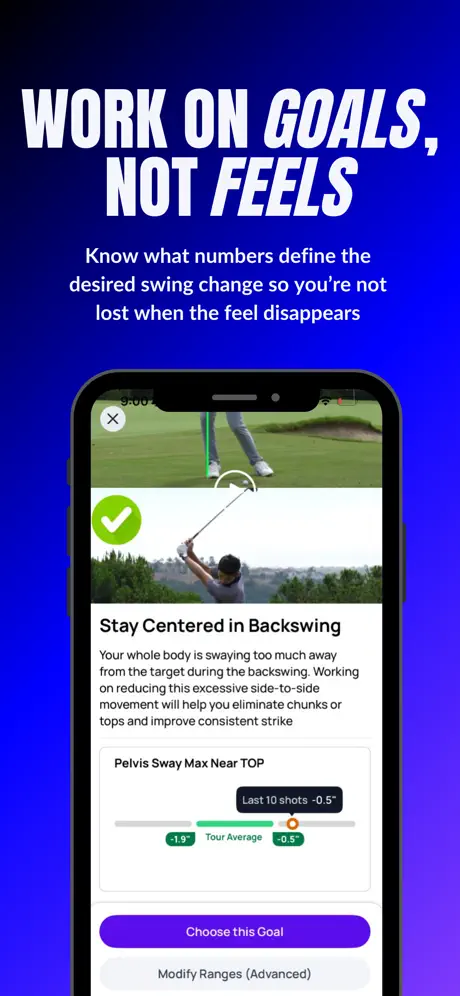
Practice goals are linked to specific metrics and target ranges. Source: official Sportsbox screenshot on the China App Store.
The phone is not merely a smaller web entry point in this workflow. The golfer is already on the range, the camera can capture movement, and the screen can return feedback before the next swing. The record also continues when the instructor is not physically present.
Input conditions still matter. Sportsbox’s import guide asks users to capture the complete swing, use slow-motion video or a frame rate between 120 and 240 frames per second, and remove unrelated motion before and after the swing. A casual blurry clip should not be expected to produce the same analysis. Video import requirements
This boundary matters commercially. The product can lower the equipment threshold for motion analysis, but it still needs users and coaches to understand how to capture usable input. Onboarding and camera setup are part of the product, not details that can be ignored after the model is built.
A free trial, then separate memberships for players and coaches
Sportsbox does not put every customer into one generic AI plan. Its paid paths reflect two different jobs.
| User | Main reason to buy |
|---|---|
| Golfer practicing independently | Analyze swings repeatedly, set goals, and compare movement changes |
| Coach or teaching organization | Manage students, explain measurements, send instruction, and follow progress after lessons |
The current website allows a free user to analyze five swings per month. The paid Player plan adds unlimited swing analysis and more goal-setting features. The China App Store also lists Player and Pro in-app purchases, although its public listing does not make every billing period unambiguous. The limited free tier lets a golfer see personal motion data before paying; continued practice and teaching management provide the recurring reason to subscribe. Free and paid features China App Store listing
This division also explains why the company needs both a self-serve mobile experience and coach-facing tools. A player may pay for repeated feedback. A coach may use the same measurement layer to serve multiple clients and maintain continuity beyond scheduled lessons. One underlying analysis capability enters two purchasing contexts.
The acquisition provides a stronger commercial signal than a celebrity endorsement alone. DeChambeau had used the product in a professional coaching workflow before leading the investor group that bought the company. It still does not disclose revenue, retention, paid-user totals, or the exact purchase price, so the transaction should not be treated as proof of a particular subscription scale.
The chat assistant came later, not at the beginning
The acquisition announcement also introduced SAMI, an assistant built with Google Cloud and Gemini that is intended to turn three-dimensional movement data into training guidance. The current beta described in the China App Store starts with preset questions and offers product help, data explanations, and swing guidance. China release history
The next product job is to translate a measurement such as shoulder rotation into an explanation of why it matters and what the golfer should try on the next swing. A coach traditionally performs that interpretation face to face. Whether the app can make the explanation understandable and useful for more golfers will determine how much value Sportsbox can add beyond measurement.
The sequence is the important product lesson. Sportsbox first created a structured record of the swing, a way to compare changes, and a workflow shared by coach and player. Only then did it add a conversational layer on top of those measurements. Without reliable context, a chat assistant would have little more than generic advice. With captured motion, goals, and historical comparisons, it can potentially answer questions about a specific training session.
That does not mean the assistant replaces a coach. The DeChambeau case itself shows the opposite: data narrowed the problem, while a coach selected the variables and decided how the player should respond. Sportsbox’s opportunity is to make more of that measurement and explanation loop available between lessons, where the golfer still needs to know whether practice is moving in the intended direction.